Complete guide to integrate Interactive Voice Response and Conversational Voice AI to turn your robotic calls into a natural human-answered call.
The convergence of traditional IVR systems with Conversational Voice AI represents a transformative opportunity to revolutionize customer service operations. Based on verified industry research, next-generation IVR systems deliver a fivefold improvement in customer satisfaction scores. With traditional call abandonment rates reaching 20% and 51% of customers avoiding IVR menus entirely, the business case for AI-augmented voice systems is compelling.
This blog outlines how to strategically integrate these technologies to create seamless, intelligent voice experiences that scale with business needs.
IVR (Interactive Voice Response) is an automated phone system that lets callers interact with pre-recorded menus using keypad Dual-Tone Multi-frequency (DTMF), also known as “touch tones” or simple voice commands, enabling them to get information or be routed to the correct department without speaking to a human agent initially.
Characteristics of IVR
- Rigid tree structure: “Press 1 for sales, 2 for support”
- Uses fixed flows and rule-based routing
- Limited to basic input and output
- Feels robotic and often frustrating
An IVR (Interactive Voice Response) system can be accessed through different communication protocols like:
1. IVR with phone number (Traditional PSTN)
- Uses the Public Switched Telephone Network (PSTN) with a dedicated phone number
- Calls are routed through traditional telecom infrastructure
- Typically involves per-minute charges from telecom carriers
- Cost range: $0.02–0.15 per minute depending on geography
2. IVR with SIP (Session Initiation Protocol)
- Uses internet protocol for voice communication
- Calls are routed over IP networks rather than traditional phone lines
- Significantly lower operational costs, especially for high-volume applications
- Requires SIP-compatible devices or software (softphones, IP phones, or SIP trunks)
- The call is made using a SIP URI
- Cost range: $0.005–0.03 per minute
3. SIP trunking with DID (Direct Inward Dialing) numbers
- Use SIP trunks that provide regular phone numbers (DIDs — Direct Inward Dialing)
- Calls to the phone number are converted to SIP and routed to your IVR
- Gets you the cost benefits of SIP while maintaining phone number accessibility
- Ideal for businesses maintaining existing phone number presence
4. Dual gateway setup
- PSTN gateway handles traditional phone calls
- SIP gateway handles IP-based calls
- Both feed into the same IVR application
Improving IVR with real-time conversational AI
Conversational Voice AI enables natural, human-like spoken conversations. Supports free-flowing dialogue, understanding natural language and emotional cues for dynamic, natural conversations.
Conversational Voice AI with Amazon Nova Sonic brings:
- A single-model, real-time speech pipeline
- Emotion and prosody aware conversational UX
- Tool-rich, data-grounded interactions
- Conversational Voice AI is true next‑gen technology for any voice-first application.
How do they work together?
Conversational Voice AI can augment IVR for a better caller experience.
Imagine a scenario: when a customer calls a company’s support line, we hear a traditional IVR system that asks you to dial 1 or dial 2 to select your preferred language or submit a reason for the call.
Instead of making the caller navigate a complex maze of call trees, the IVR now handles initial assessment and performs a smart handoff to a conversational Voice AI system. From there, the conversation shifts into something far more natural.
The AI listens to the caller’s request and understands them without rigid prompts. Using advanced speech-to-speech technology like Amazon Nova Sonic, the system responds with a human-like voice that carries natural intonation and emotional awareness.
This makes the interaction smoother, more personal, and less like talking to a robot. The Voice AI interprets the caller’s intent, fetches relevant information, and completes the task—all without requiring a human agent.
By working together, IVR and Conversational Voice AI create a seamless, intelligent experience that feels more like a conversation than a transaction.
Key components to integrate LiveKit (Amazon Nova Sonic) and Twilio (IVR)
LiveKit is an open-source platform for developers building realtime media applications. It makes it easy to integrate audio, video, text, data, and AI models while offering scalable, real-time infrastructure built on top of WebRTC.
Advantages of using LiveKit over using AWS Bedrock SDK:
- LiveKit uses AWS Bedrock SDK under the hood to access Nova Sonic.
- It supports WebRTC infrastructure to stream audio of users to AWS Bedrock SDK. This has to be done manually if we don’t use LiveKit.
- Provides an abstraction layer for sending events (text/audio/tool). Such that it’s easier to send chat history, define tools and audio inputs.
- LiveKit and Twilio integration bridges traditional telephony (via Twilio) with real-time audio processing (via LiveKit + Amazon Nova Sonic). It allows a user to call a phone number (hosted by Twilio), get connected via SIP to a LiveKit session, and then interact with an AI-powered voice agent (powered by Nova Sonic).
See how each of these components interacts with the others:
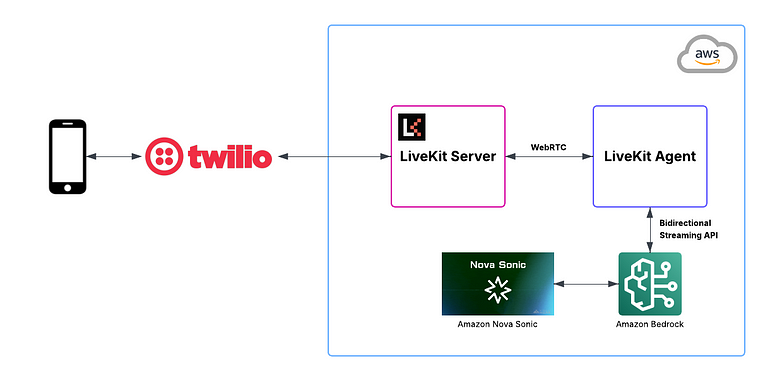
Figure 1: Architecture diagram showing the integration between IVR systems and Conversational Voice AI using LiveKit and Twilio
Twilio (SIP Trunk & IVR)
- Receives phone calls via PSTN and connects to LiveKit SIP Gateway using SIP URI.
LiveKit SIP service
- Acts as a SIP bridge to convert Twilio SIP calls into a LiveKit participant.
- Enables real-time bidirectional audio streaming via WebRTC.
- Seamlessly connects SIP callers to a LiveKit room, allowing interaction with the AI agent in real time.
LiveKit agent
- A real-time AI agent that joins the LiveKit room.
- Listens to the caller, maintains conversational context.
- Sends/receives audio from Amazon Nova Sonic.
Amazon Nova Sonic (Speech To Speech Foundation Model)
-
A foundation model for speech-to-speech conversation which helps in bidirectional streaming mode for low-latency voice interactions.
-
One key consideration in this architecture is the 8-minute timeout limit for Nova Sonic sessions. If the call exceeds the 8-minute limit, the session will automatically disconnect. To continue the conversation for such sessions:
- You have to re-initialize the new Nova Sonic session with all the context history of the previous session.
- And restore the full conversation history to preserve context continuity.
- This is essential to ensure a seamless user experience in longer interactions, such as support calls, consultations, or interviews.
Data Flow
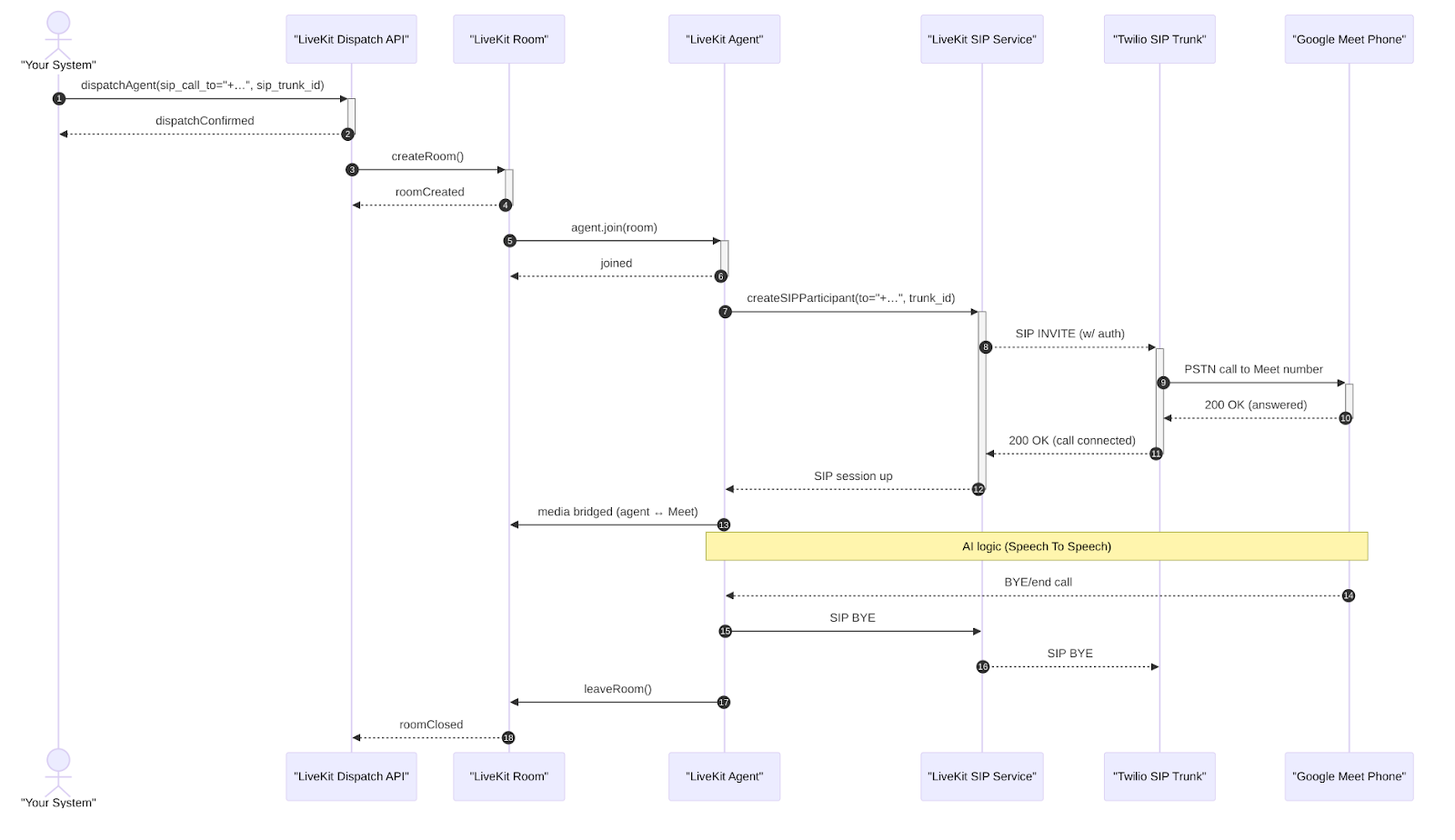
Figure 2: Data flow from phone call to amazon nova sonic response
- A user calls a Twilio-managed phone number.
- Audio is streamed from caller to room via SIP/WebRTC.
- Agent gets audio frames, and sends it to Nova Sonic.
- Response is streamed back into the room in real-time.
Complete integration setup
The following steps walk through how to configure and connect all components in your voice AI system:
Step 1: Configure Twilio SIP Trunk to LiveKit
- Set up an Elastic SIP Trunk in Twilio, pointing its origination URI to your LiveKit SIP endpoint (e.g.,
sip:your-trunk.pstn.twilio.com→sip:<livekit-sip-host>) - Associate the trunk with your Twilio phone number.
- This ensures inbound PSTN calls are routed via SIP into LiveKit.
Step 2: Register outbound trunk in LiveKit
- Use LiveKit CLI or API to create an outbound trunk pointing to Twilio’s trunk domain (
<twilio-trunk>.pstn.twilio.com) with credentials and your Twilio number(s) - This enables LiveKit to place outbound calls back through Twilio.
Step 3: Build or configure your LiveKit AI agent
- Create a named agent (e.g. “meet-phone-agent”) with explicit dispatch.
- This sets up your agent to be dispatched on-demand.
Step 4: Trigger agent dispatch
- When you want to initiate a call, call LiveKit’s Agent Dispatch API, passing metadata with:
sip_call_to: the Google Meet phone number (in E.164)sip_trunk_id: your outbound trunk IDroom_name,participant_identity, etc
Step 5: LiveKit agent parking
- Upon dispatch, the agent:
- Joins a new LiveKit room (audio-only)
- Uses CreateSIPParticipant to dial the Google Meet number via Twilio
- Once answered, bridges the call between the agent and the Meet phone line.
Step 6: During the call
- LiveKit orchestrates the real-time media and agent lifecycle.
- LiveKit acts as the infrastructure layer, ensuring stable real-time communication and enabling low-latency agent decision-making through LLM integration.
- The bridge between agent and PSTN is maintained via SIP trunks.
- You can support DTMF, transcription, etc through agent config.
Step 7: End & cleanup
- When conversation ends (agent terminates), the SIP participant and agent leave the LiveKit room.
- LiveKit will update call status and optionally trigger post-call actions.
Conclusion
The integration of Conversational Voice AI with traditional IVR systems represents a strategic inflection point for customer service operations. Organizations that successfully implement this hybrid approach will gain significant competitive advantages through improved customer experiences, operational efficiency, and cost optimization.
The key to success lies in thoughtful planning, phased implementation, and continuous optimization based on real-world performance data. By following the frameworks and strategies outlined in this guide, businesses can transform their voice automation capabilities while maintaining the reliability and scalability that customers expect.
The future of voice automation is conversational, intelligent, and deeply integrated with business processes. Organizations that begin this transformation today will be best positioned to leverage the next generation of AI-powered customer service technologies as they emerge.